> For the complete documentation index, see [llms.txt](https://guide.cspersonalfinance.io/llms.txt). Markdown versions of documentation pages are available by appending `.md` to page URLs; this page is available as [Markdown](https://guide.cspersonalfinance.io/investments/how-to-find-an-asset-ticker.md).
# How to find an Asset Ticker
This sheet supports live pricing from Google, MorningStar, FT.com and Yahoo Finance. Depending on where your asset is listed, use the corresponding pricing provider.
## Google Finance (ETFs, Stocks only)
1\. Google your Fund Name with the following search: *"AssetNameHere Share Price"*
2\. Copy the ID as per below into the Sheet:
Example of Apple Share Price ID being 'NASDAQ:AAPL'
## MorningStar - UK Funds
1\. Google your Fund Name with the following search: *"MorningStar FundNameHere"*
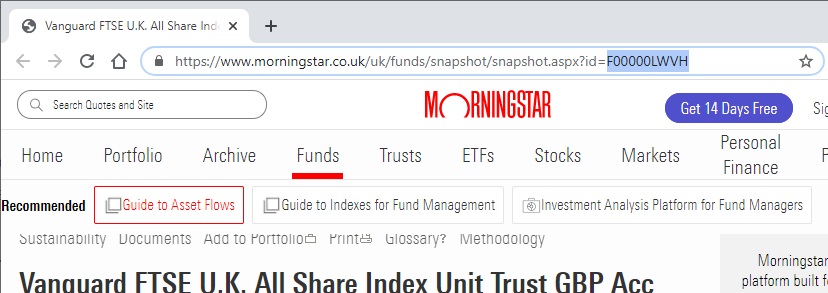
2\. Copy the ID in the URL of the page as per below into the Sheet:
## MorningStar - Australian Funds
1\. Google your Fund Name with the following search: *"MorningStar FundNameHere"*
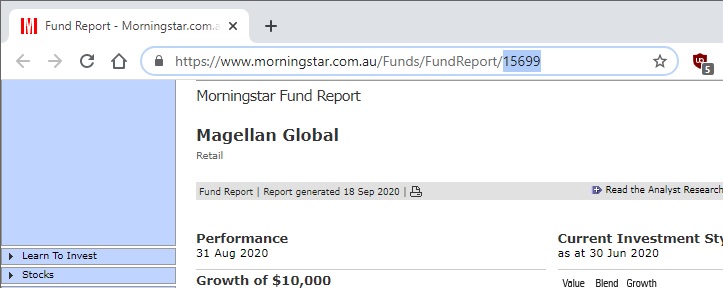
2\. Copy the ID in the URL of the page as per below into the Sheet:
3\. Convert the ID to a native MorningStar ID [using this tool here.](https://cspersonalfinance.io/tools/morningstarLookup)
## Yahoo Funds
1\. Google your Fund Name with the following search: *"Yahoo Finance FundNameHere"*
2\. Copy the ID in the URL of the page as per below into the Sheet
## FT.com Funds
1\. Google your Fund Name with the following search: *"FT.com FundNameHere"*
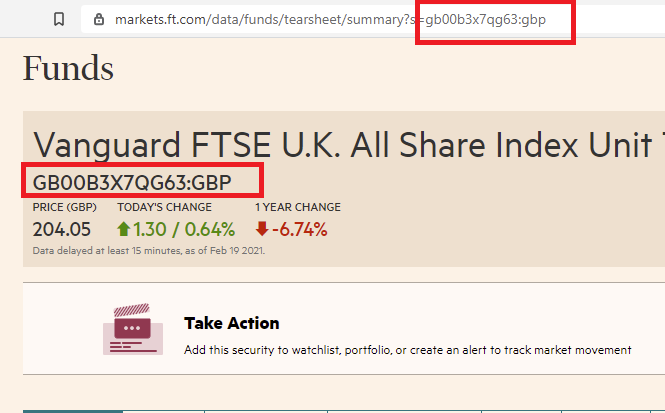
2\. Copy the ID in the URL of the page as per below into the Sheet: